Ask for the page your team needs.
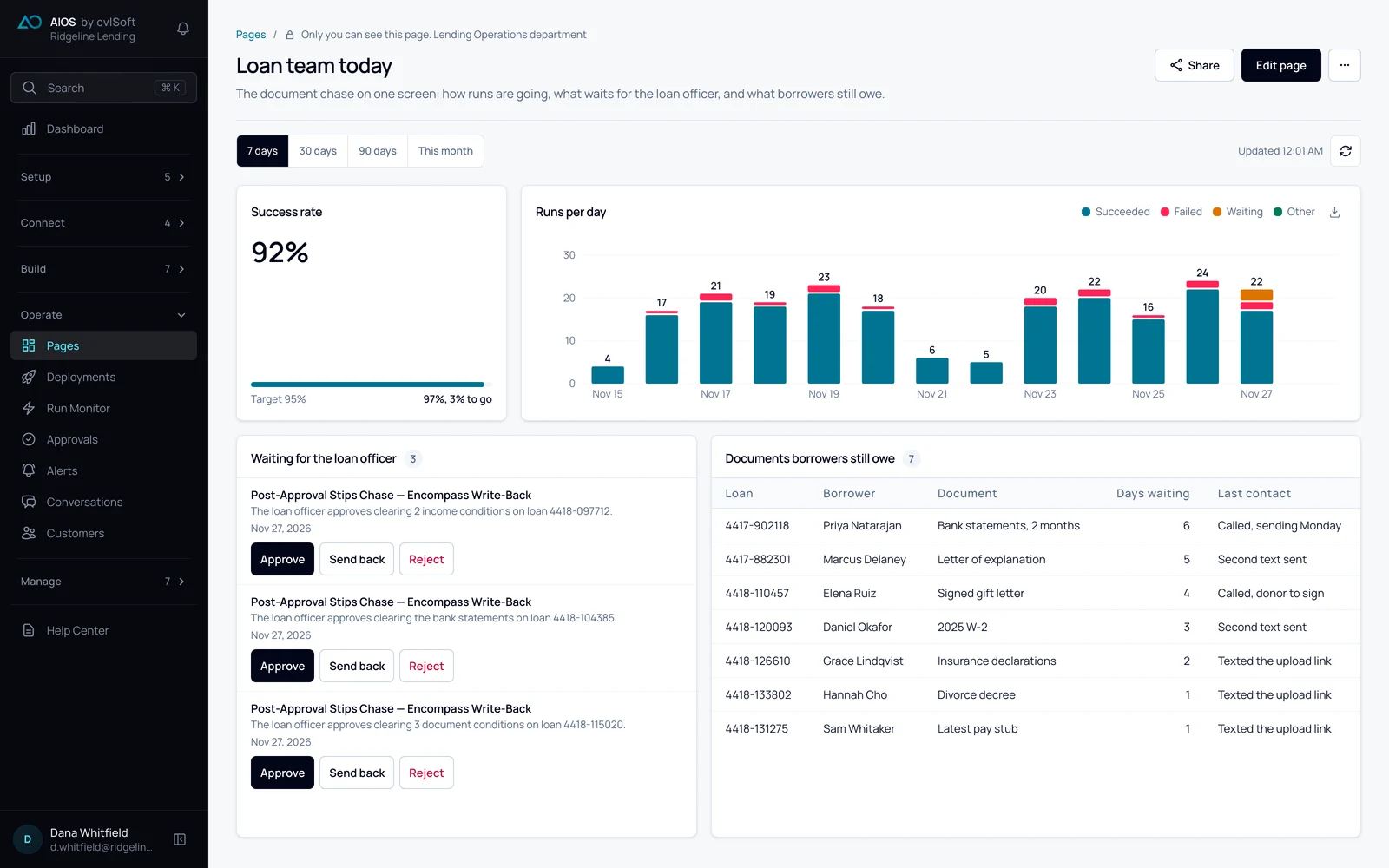
A dispatcher wants today’s open jobs on a map. A team lead wants the approvals waiting on them and the runs that failed overnight. Ask Lens for that page and it builds it from live AIOS data and your own systems, shows you its plan first, and opens it. Your team approves, retries and sends forms from the same page, and each person sees only what their own access allows.
Three ways to start.
Describe it. Tell the AIOS agent what you want to see. It lists each widget and where its data comes from, and builds the page when you say yes.
Start from the overview. Run counts, success rate, runs per day and recent runs, ready to change.
Start blank. Pick each widget and its data, with a live preview before you add it.
What Lens does.
Every page is built from a fixed set of parts and filled with live data each time it opens.
It shows the plan, then builds.
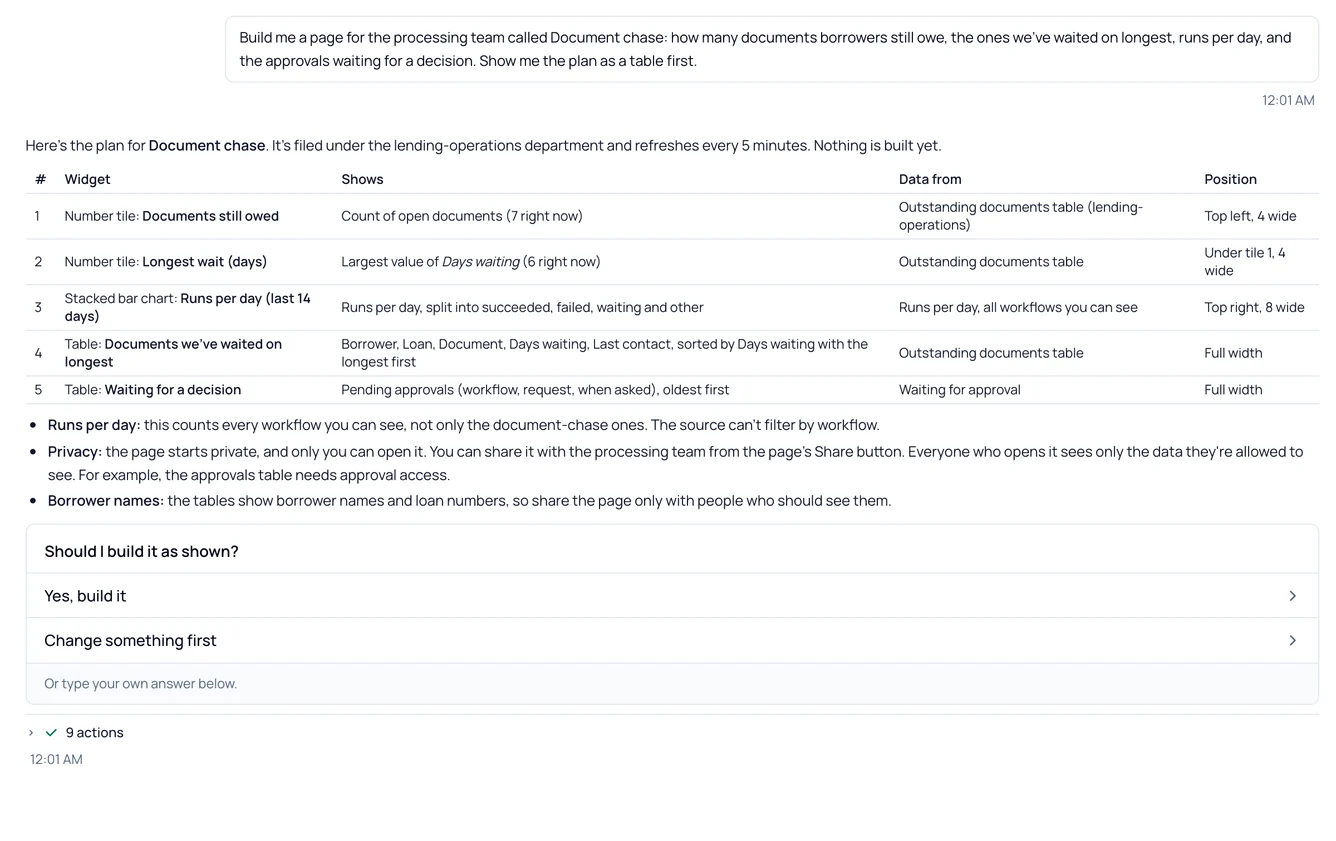
Ask for a page, such as this week’s failed runs by workflow. The AIOS agent lists each widget, what it shows and where the data comes from, and builds the page once you say yes. Ask again to change it, or drag and resize on the page.
Live each time it opens.
A page keeps its layout and none of the data. Each widget reads fresh data when the page opens, when you refresh, or every few minutes while it’s on screen, and says when it last did.
From AIOS and from your systems.
Runs, success rates, approvals and workflows from AIOS, rows from a connection such as a spreadsheet tab or a ticket queue, and the answers your forms collected. Shown as number tiles with targets, charts, tables, lists and maps.
Act where you see it.
An approval waiting on the page can be approved, sent back with guidance or rejected right there, and a failed run retried, by anyone with permission to do it.
Forms that start the work.
A form on the page starts its workflow as the person who sent it, with the same approvals, policies and budget as any other run. A page never writes to your systems directly.
Each viewer sees what their access allows.
Sharing a page shares the layout. Every widget checks the viewer’s own access before it shows anything, so someone who can’t see a source gets a note saying so.
Built from one request.
Describe the page in a sentence. The plan lists every widget before anything is built, and the page opens with live data once you say yes.
Shared the way you choose.
A page is private until you share it.
People, roles or a department.
Share to view or to edit. A page shared with a role follows the role as people join and leave.
A copy for anyone who can view.
Viewers can duplicate a page into their own copy to change.
Every save kept.
Each save keeps the version before it, so a bad edit is one restore away.
On the record.
Every share, change and restore is on the activity log, and admins see every shared page.
In the browser and the desktop app.
The same pages in both, pinned to the side menu.
How it compares.
Automation suites can build dashboards and forms too, often as a separate product beside the automation. Here a page reads the same runs, approvals and roles the work runs on.
| Capability | AIOScvlSoft | Agent platformsOpenAI Frontier, Anthropic | Service agentsSierra, Fin, Decagon | AutomationUiPath, Power Automate | In-app agentsSalesforce Agentforce |
|---|---|---|---|---|---|
| Builds live pages of the work on requestTiles, charts, tables, maps and forms from AIOS and your systems, showing each viewer only what they may see. | |||||
| An expert’s sign-off on the steps that matterThe run pauses, and the decision is recorded beside the action it authorized. | |||||
| Every run explained in plain languageWhat happened and why, not a log only an engineer can read. | |||||
| Custom roles, departments and scoped keysPeople and integrations see only what their work needs. |
A category view, not a product audit: each column names one or two examples, and individual products vary. See all 34 rows
Questions.
Does someone have to build the pages for us?
No. Ask the AIOS agent for the page you want, or start from the overview and change it.
Can a shared page show someone data they shouldn’t see?
No. Every widget checks the viewer’s own access before it shows anything. Someone who can’t see a source gets a note saying so.
Can a page change our data?
Only through a workflow. A form or button on a page starts a workflow, with its approvals, policies and budget. Approving or retrying from a page uses the viewer’s own permissions.
Can it show data from outside AIOS?
Yes. A widget can read one of your connections, such as a spreadsheet tab or a list of tickets, and only reads that change nothing are offered. It can also show the records your workflows saved.
Does it replace our BI tool?
No. Lens shows the work AIOS runs and the systems it’s connected to, ready to act on. Deep analysis across all your data stays in your BI tool.